
Our Company
Elements of Digital Textiles
Simple, Transparent and Quick. Helping you find the perfect textile for your application
The Berger Textiles Periodic Table
A smart visual tool designed to simplify material selection.
Inspired by the classic periodic table, it organises the entire textile portfolio into a clear and structured layout. Each position represents a textile solution, making it easy to scan and quickly understand available options. This approach reduces complexity and help you find the right material faster and more efficiently.
Products are grouped
Clearly defined categories based on application and performance.
Ranges such as be.light (lightboxes), be.outdoor (outdoor use), and be.flag (flags) help users quickly identify the right product family for your needs, while the list continues with many more specialised categories. This structure improves navigation and ensures a more focused and efficient selection process.
Intuitive and informative
Each tile represents a textile and includes key information for selection.
Intuitive icons show compatible printing technologies like UV, dye sublimation, or latex, allowing users to quickly check suitability for your setup. This makes comparing products easier and reduces trial and error in the decision-making process.
Product Name
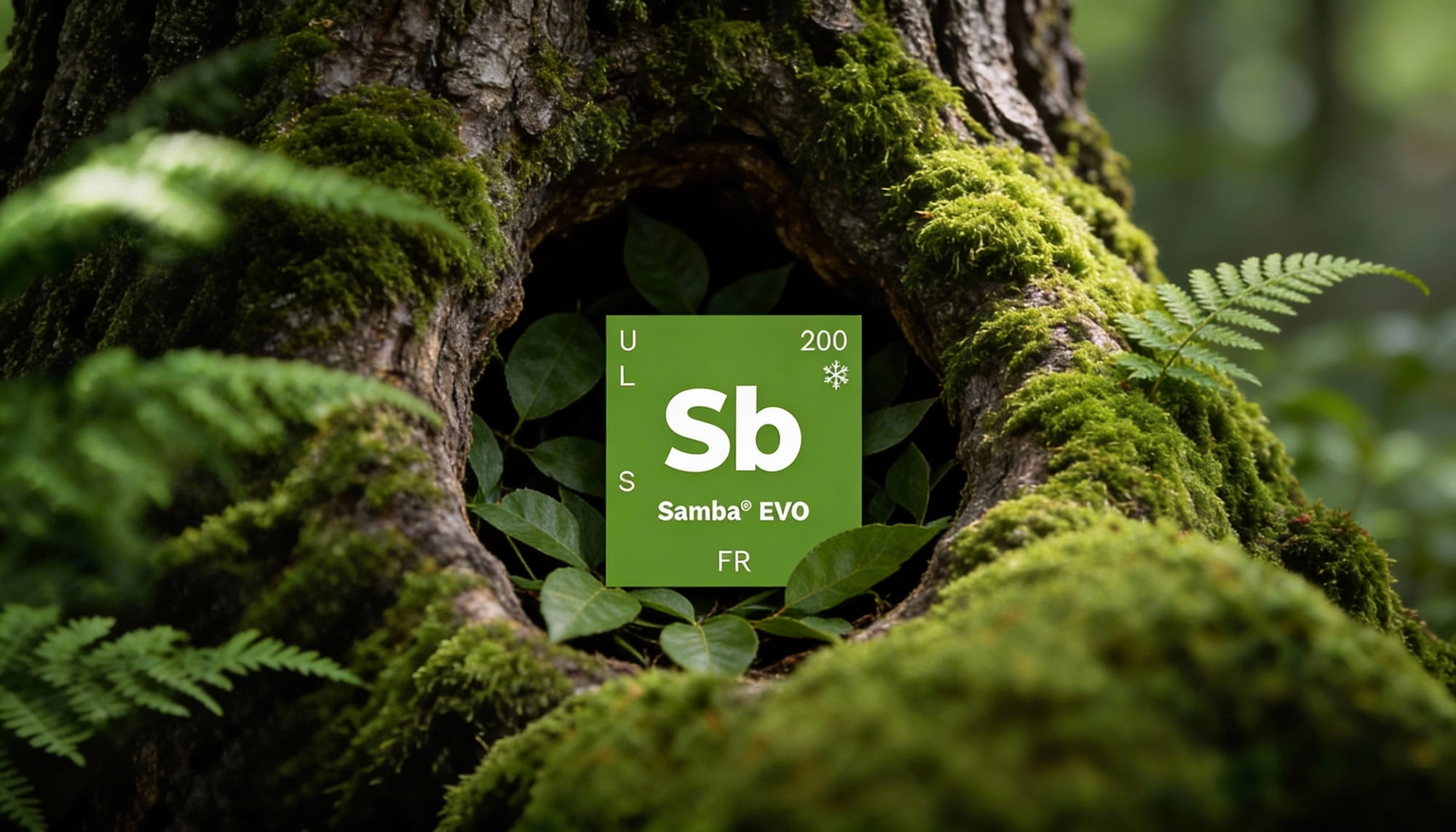
The product name is listed clearly towards the bottom centre of the element tile, with a larger, bold, two-letter abbreviation for quick reference—just like you’d find on your Periodic Table of Elements.
Inkset
On the left-hand side of the tile, you’ll find single letters that denote which print technology each product is compatible with. Of course, we always recommend testing and profiling new products as there are many different variables when it comes to equipment and ink manufacturers.
U = UV Cure
L = Latex / Resin
S = Eco-Solvent
D = Direct Sublimation
T = Transfer Sublimation
P = Pigment
W = Water Based
L = Latex / Resin
S = Eco-Solvent
D = Direct Sublimation
T = Transfer Sublimation
P = Pigment
W = Water Based
Weight
In the top right of the element tile, the product weight is listed in ounces per square yard. If you prefer your fabric weight in grams per square metre, simply find the product you’re looking for under the Soft Signage tab at the top of our website. The product details will show you the metric weight, along with other product attributes.
Cutting
Located directly below the weight on the upper right-hand side of the tile, you’ll find a symbol for either a snowflake, or a flame. The snowflake indicates the fabric can be cold cut with a knife or traditional cutting system, while the flame suggests the material should be cut with a hot knife or laser cutting system (to avoid fraying). All “cold-cut” products can also be hot/laser cut, if desired.
Fire Certification
At the bottom center of the tile, the letters “FR” will indicate if the product has been treated with a fire-retardant coating and has earned FR certification. Specific FR certifications are found on each individual product’s page, and copies of these certificates are available upon request.
Watch our visual explanation of our periodic table.